Automating TradingView Indicator Signals Through OctoBot Webhooks
Summary
This guide explains how to connect TradingView indicator alerts to OctoBot so that alert signals can trigger automated trades on a connected exchange. The described setup involves creating an indicator alert, configuring OctoBot’s webhook as the destination, and supplying an alert message. OctoBot’s webhook address is available in its configuration or startup logs, and the relevant webhook-related trading component must be active for the endpoint to run.
The page points readers to separate instructions for alert-message formatting and the broader TradingView integration. It does not define a signal-generation method, order sizing, risk controls, or exchange execution behavior, and it gives no backtest or live-trading evidence. The guide therefore covers the signal-delivery plumbing needed to automate an existing indicator, while the quality and safety of trading decisions depend on the indicator and the rest of the bot’s configuration.
Key ideas
- TradingView indicator alerts can send signals to OctoBot through a webhook.
- The setup requires an alert, a configured webhook destination, and an alert message.
- The related OctoBot webhook component must be active for the endpoint to be available.
- Separate documentation covers alert formatting and the broader integration.
- The page explains signal routing, not the merits or performance of any indicator.
Tags
Full text
# Automatiser le trading d'un indicateur TradingView --- title: "Trader depuis un indicateur" description: "Apprenez comment faire en sorte qu'OctoBot trade en fonction des indicateurs TradingView. Envoyez des signaux depuis les indicateurs TradingView Pine Script et faites en sorte qu'OctoBot effectue instantanément des transactions sur votre plateforme d'échange." sidebar_position: 1 --- # Automatiser le trading d'un indicateur TradingView :::info La traduction française de cette page est en cours. ::: With OctoBot, you can listen to <a href="https://www.tradingview.com/?aff_id=27595" rel="nofollow">TradingView</a> indicator signals to automate your trades. ## Créer une alerte d'indicateur - Go to the right menu and click on the alert button 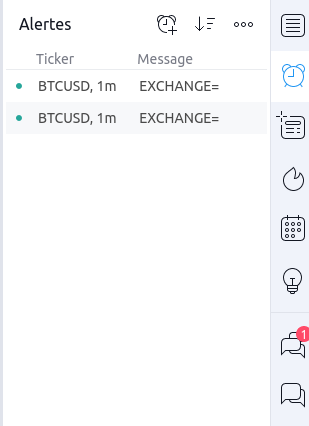 - Create a new alert with  you want - Add your OctoBot [webhook](using-a-webhook) as the following screenshot. 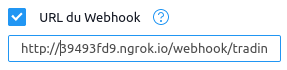 You will find OctoBot's alert webhook URL on your OctoBot's configuration page or in OctoBot's starting logs. It should be an url like `https://webhook.octobot.cloud/tradingview/xxxx` or `http://XXXXXXXX.ngrok.io/webhook/trading_view`. WARNING: To improve performances, webhooks are started only when required, this means that **you need to activate a webhook related tentacle to get the webhook url** (a tentacle such as the **trading view signals trading mode**)   - Set the alert message ## Format de l'alerte Learn more about how to create your TradingView alerts on [the TradingView alert format guide](/guides/octobot-interfaces/tradingview/alert-format). ## Configuration de TradingView Wondering how to make your OctoBot listen to TradingView signals? Checkout [our TradingView integration guide](/guides/octobot-interfaces/tradingview).
Shown in full with attribution under the source's licence. Licence: GPL-3.0
This summary was written by Stratmill's research agent from the original; it is not a copy of the source.