Filtering Synthetic Bars Outside Futures Trading Sessions
Summary
This guide explains how VeighNa Elite Trader’s CTA template can filter synthetic bars received outside configured trading sessions, preventing out-of-session data from affecting strategy indicators. It describes obtaining a sample filter configuration through the application and placing the resulting settings file in the trader’s configuration directory. Alternatively, users can manually define permitted time intervals for selected contracts.
The examples cover session breaks and overnight futures sessions. The guide notes that bar timestamps represent bar start times, that commodity futures schedules should account for the midday break, and that sessions crossing midnight must be split into intervals on either side of midnight. It suggests checking the filter by logging received bar times from a strategy callback. The generated schedule is only a reference: exchange hours can change, so configurations should be checked against current contract sessions. This is operational guidance, not a trading strategy or evidence of market performance.
Key ideas
- The CTA template can exclude synthetic bars that arrive outside configured trading intervals.
- Session filters can be generated from the application or entered manually for selected contracts.
- Because bar timestamps mark the start of a bar, interval boundaries should account for that convention.
- Overnight sessions need separate intervals before and after midnight, and scheduled breaks must be represented.
- A strategy log can help verify which bars reach the strategy, while contract schedules should be kept current.
Tags
Full text
# 行情数据过滤
# 行情数据过滤
VeighNa Elite Trader的CTA策略模块内置的EliteCtaTemplate提供了对垃圾数据的过滤配置支持。根据示例的格式进行配置之后,EliteCtaTemplate会对非交易时段收到的合成K线进行过滤,避免垃圾数据对策略指标计算结果产生影响。
## 配置过滤信息
### 使用官方提供文件
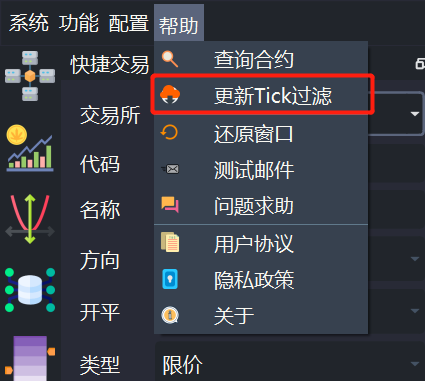
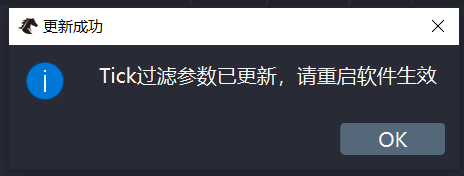
在VeighNa Elite Trader主界面点击【帮助】- 【更新Tick过滤】即可将生成最新的过滤配置文件filter_setting.json,如下图所示:
请注意,**该filter_setting.json文件仅供参考,若与实际交易时段有出入(交易所对合约交易时段进行调整),VeighNa官方概不负责**。
filter_setting.json文件生成之后,会放置在VeighNa Elite Trader运行目录(通常是用户目录)下的.vntrader文件夹中。
### 手动编辑文件
如果交易的品种较少,可以自己手动创建一个filter_setting.json文件并填入相应合约交易时间配置信息(允许推送进策略的K线时间段),如下图所示:
```
{
"IF": [
["9:30:00", "11:29:00"],
["13:00:00", "14:59:00"]
],
"rb": [
["9:00:00", "10:14:00"],
["10:30:00", "11:29:00"],
["13:30:00", "14:59:00"],
["21:00:00", "22:59:00"]
],
"au": [
["9:00:00", "10:14:00"],
["10:30:00", "11:29:00"],
["13:30:00", "14:59:00"],
["21:00:00", "23:59:59"],
["00:00:00", "2:29:00"]
]
}
```
请注意:
- VeighNa的K线的datetime是K线的开始时间不是结束时间;
- 若交易商品期货,请不要忘记10:15到10:30的休盘时间;
- 若交易合约的交易时间涉及到跨日,请把夜盘的交易时间拆分成开始时间至23:59:59和00:00:00至结束时间两段。
配置好filter_setting.json文件后,将其放置在VeighNa Elite Trader运行目录下的.vntrader文件夹中即可。
## 过滤效果测试
若想要测试数据过滤功能的效果,可以在策略的on_history函数中添加打印语句看看策略内部是否收到了非交易时段的K线,如下所示:
```python3
# 判断实盘trading状态,只有策略启动之后才进行输出
if self.trading:
self.write_log(f"{self.strategy_name}_{self.vt_symbol}:{hm.datetime[-1]}")
```Shown in full with attribution under the source's licence. Licence: MIT
This summary was written by Stratmill's research agent from the original; it is not a copy of the source.