Formatting TradingView Alerts for OctoBot Orders and Cancellations
Summary
This guide explains how TradingView webhook alert messages can direct the open-source OctoBot to place or cancel exchange orders. A basic order alert identifies the exchange, symbol, and buy or sell signal. Optional fields specify order type, volume, price, stop price, take-profit targets, leverage, reduce-only behavior, and a tag for later order identification. The guide also describes splitting an entry across multiple take-profit levels, either evenly or by supplied volume ratios.
Cancellation alerts can target a symbol and exchange, with optional filters for order side and tag. The page gives sample messages for limit buys and sells, a stop order, and cancellation, plus an option to include an OctoBot-generated token in webhook alerts. These are message-format instructions rather than trading rules: they do not assess signal quality, execution outcomes, or risk. Order behavior differs by whether a position is increasing or decreasing and by whether trading spot or futures, so the stated conditions matter when configuring alerts.
Key ideas
- A basic order alert identifies the exchange, trading symbol, and buy or sell direction.
- Optional fields configure order type, size, prices, take-profit targets, leverage, and reduce-only behavior.
- Multiple take-profit targets can divide the entry volume evenly or according to supplied ratios.
- Cancellation alerts can filter orders by symbol, exchange, side, and tag.
- A generated token can be included in webhook messages as an additional security measure.
Tags
Full text
# Format des alertes TradingView
---
title: "Format d'une alerte"
description: "Trouvez toutes les informations dont vous avez besoin pour formater vos alertes TradingView et automatiser les transactions sur votre OctoBot. Achetez ou vendez avec des ordres au marché ou à seuil, définissez des objectifs de profit et des stops."
sidebar_position: 3
---
# Format des alertes TradingView
:::info
La traduction française de cette page est en cours.
:::
:::info
The following guide describes how to format TradingView alerts to trade using the [open source version of OctoBot](../../octobot).
:::
## Créer des ordres
### Contenu minimal d'une alerte
The alert format is designed to be easily used from TradingView. Minimal alerts contain the exchange name, the alert symbol (BTCUSDT for BTC/USDT and BTC/USDT:USDT) and the side of the order to create.
Example:
``` bash
EXCHANGE={{exchange}}
SYMBOL={{ticker}}
SIGNAL=BUY
```
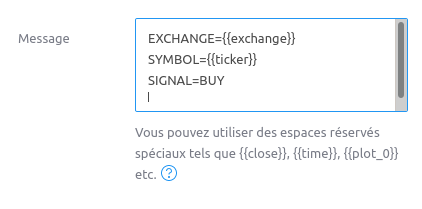
For a buy signal.
``` bash
EXCHANGE={{exchange}}
SYMBOL={{ticker}}
SIGNAL=SELL
```
For a sell signal.
Parameters can be separated using a new line or a `;` character.
### Parametres d'alertes additionels
Additional order details can be added to the alert. These are optional:
``` bash
ORDER_TYPE=LIMIT
VOLUME=0.01
PRICE=42000
STOP_PRICE=38000
TAKE_PROFIT_PRICE=55000
REDUCE_ONLY=true
```
- `ORDER_TYPE` is the type of order, it can be `MARKET`, `LIMIT` or `STOP`
- `VOLUME` is the volume of the order in base asset (BTC for BTC/USDT), it supports the [orders amount syntax](/guides/octobot-trading-modes/order-amount-syntax).
- `PRICE` is the price of the limit order in quote asset (USDT for BTC/USDT)
- `STOP_PRICE` is the price of the stop order to create. When increasing the position or buying in spot trading, the stop loss will automatically be created once the initial order is filled. When decreasing the position (or selling in spot) using a LIMIT `ORDER_TYPE`, the stop loss will be created instantly. _Required when `ORDER_TYPE=STOP`_.
- `TAKE_PROFIT_PRICE` is the price of the take profit order to create. When increasing the position or buying in spot trading, the take profit will automatically be created once the initial order is filled. When decreasing the position (or selling in spot) using a LIMIT `ORDER_TYPE`, the take profit will be created instantly. The [orders price syntax](/guides/octobot-trading-modes/order-price-syntax) is supported. Multiple take profit prices can be used from `TAKE_PROFIT_PRICE_1`, `TAKE_PROFIT_PRICE_2`, ... When using multiple take profits, the initial entry amount will be evenly split between take profits unless a `TAKE_PROFIT_VOLUME_RATIO` is set for each take profit.
- `TAKE_PROFIT_VOLUME_RATIO` is the ratio of the entry order volume to include in this take profit. Used when multiple take profits are set. Specify multiple values using `TAKE_PROFIT_VOLUME_RATIO_1`, `TAKE_PROFIT_VOLUME_RATIO_2`, …. When used, a `TAKE_PROFIT_VOLUME_RATIO` is required for each take profit.
Exemple: `TAKE_PROFIT_PRICE=1234;TAKE_PROFIT_PRICE_1=1456;TAKE_PROFIT_VOLUME_RATIO_1=1;TAKE_PROFIT_VOLUME_RATIO_2=2` will split 33% of entry amount in TP 1 and 67% in TP 2.
- `REDUCE_ONLY` when true, only reduce the current position (avoid accidental short position opening when reducing a long position). **Only used in futures trading**. Default is false
- `TAG` is an identifier to associate to the order(s) to create. Any value can be used as tag. Tags can later be used to cancel specific orders.
- `LEVERAGE` the updated leverage value to use. **Only used in futures trading**.
### Exemples
#### Un ordre d'achat limité de 0.01 BTC à 30000 USDT avec un take profit
``` bash
EXCHANGE=binance
SYMBOL=BTCUSDT
VOLUME=0.01
PRICE=30000
TAKE_PROFIT_PRICE=35000
SIGNAL=BUY
ORDER_TYPE=LIMIT
```
#### Un ordre de vente limité de 0.01 ETH à 0.1 BTC
``` bash
EXCHANGE=binance
SYMBOL=ETHBTC
VOLUME=0.01
PRICE=0.1
SIGNAL=SELL
ORDER_TYPE=LIMIT
```
#### Un ordre de vente en stop loss de 10 ATOM à 5 USDT avec un tag "exit1"
``` bash
EXCHANGE=binance
SYMBOL=ATOMUSDT
VOLUME=10
STOP_PRICE=5
SIGNAL=SELL
ORDER_TYPE=STOP
TAG=exit1
```
## Annuler des ordres
Use `SIGNAL=CANCEL` to cancel orders identified buy their `SYMBOL` and `EXCHANGE`
### Annuler tous les ordres d'ETH/BTC sur Binance
``` bash
EXCHANGE=binance
SYMBOL=ETHBTC
SIGNAL=CANCEL
```
### Annuler tous les ordres vente d'ATOM/USDT avec le tag "exit1" sur Binance
``` bash
EXCHANGE=binance
SYMBOL=ATOMUSDT
SIGNAL=CANCEL
PARAM_SIDE=SELL
TAG=exit1
```
Additional cancel parameters are available:
- `PARAM_SIDE` is the side of the orders to cancel, it can be `buy` or `sell` to only cancel buy or sell orders.
- `TAG` is the tag to select orders to cancel with. When provided, only orders created with the given tag and symbols will be canceled.
## Sécurité des alertes
You can use a token to add a security layer on your webhook alerts using
an identification token, this token is randomly generated by your
OctoBot and can be found on the configuration interface and in execution
logs.
To add your token on the tradingview.com signal: add the following line
to the alert message:
``` bash
TOKEN=YOUR_TOKEN
```Shown in full with attribution under the source's licence. Licence: GPL-3.0
This summary was written by Stratmill's research agent from the original; it is not a copy of the source.