Operating CTA Strategies in VeighNa Fusion: Setup, Monitoring, and Checks
Summary
This guide explains the CTA strategy workflow in VeighNa Fusion, from connecting to the trading gateway and creating a strategy instance to configuring parameters, initializing, starting, and stopping it. Each instance has its own target contract, parameter set, and runtime state. The guide recommends learning parameter meanings before changing them, beginning with defaults, and changing only a small number of settings at a time. It also advises using historical backtests to assess changes before moving to live trading.
For operational monitoring, it directs users to check strategy parameters, internal variables, and logs, then cross-check orders, fills, and positions in the main application. A successful startup alone does not confirm that the strategy is behaving as intended. The guide also explains that local stop-order information may differ from the resulting limit order shown in the main order view. It offers process and troubleshooting guidance rather than evidence about any strategy’s returns; users still need to verify data, connectivity, contract details, market suitability, and risk controls, and review externally generated strategies before use.
Key ideas
- A CTA instance combines a strategy, target contract, parameters, and independent runtime state.
- Users should understand parameters and assess changes through backtesting before live use.
- Monitoring should include strategy variables and logs as well as orders, fills, and account positions.
- A successful startup does not by itself establish correct operation or execution.
Tags
Full text
# CTA策略 # CTA策略 `CTA策略` 是 VeighNa Fusion 中最核心的量化交易模块之一。对于多数入门用户而言,理解并掌握 CTA 模块,意味着正式进入“策略加载、参数配置、运行监控和结果复核”的量化交易流程。 ## 什么是CTA策略 CTA 是一种常见的程序化交易方式。放在 Fusion 中理解,可以把它看成: - 根据预先定义好的策略逻辑自动生成交易信号; - 根据策略参数运行在指定合约上; - 在运行过程中持续更新持仓、委托、成交和变量状态; - 配合历史回测、参数优化和风控管理形成完整使用闭环。 对于初学者来说,建议先把 CTA 模块理解为“运行策略的工作台”,而不是一开始就关注底层实现细节。 ## 打开CTA模块 登录软件并完成 `CTP` 连接后,可通过 `【功能】->【CTA策略】` 打开 CTA 模块。  进入模块后,通常可以看到策略监控区域、实例操作按钮、参数信息和变量信息等内容。 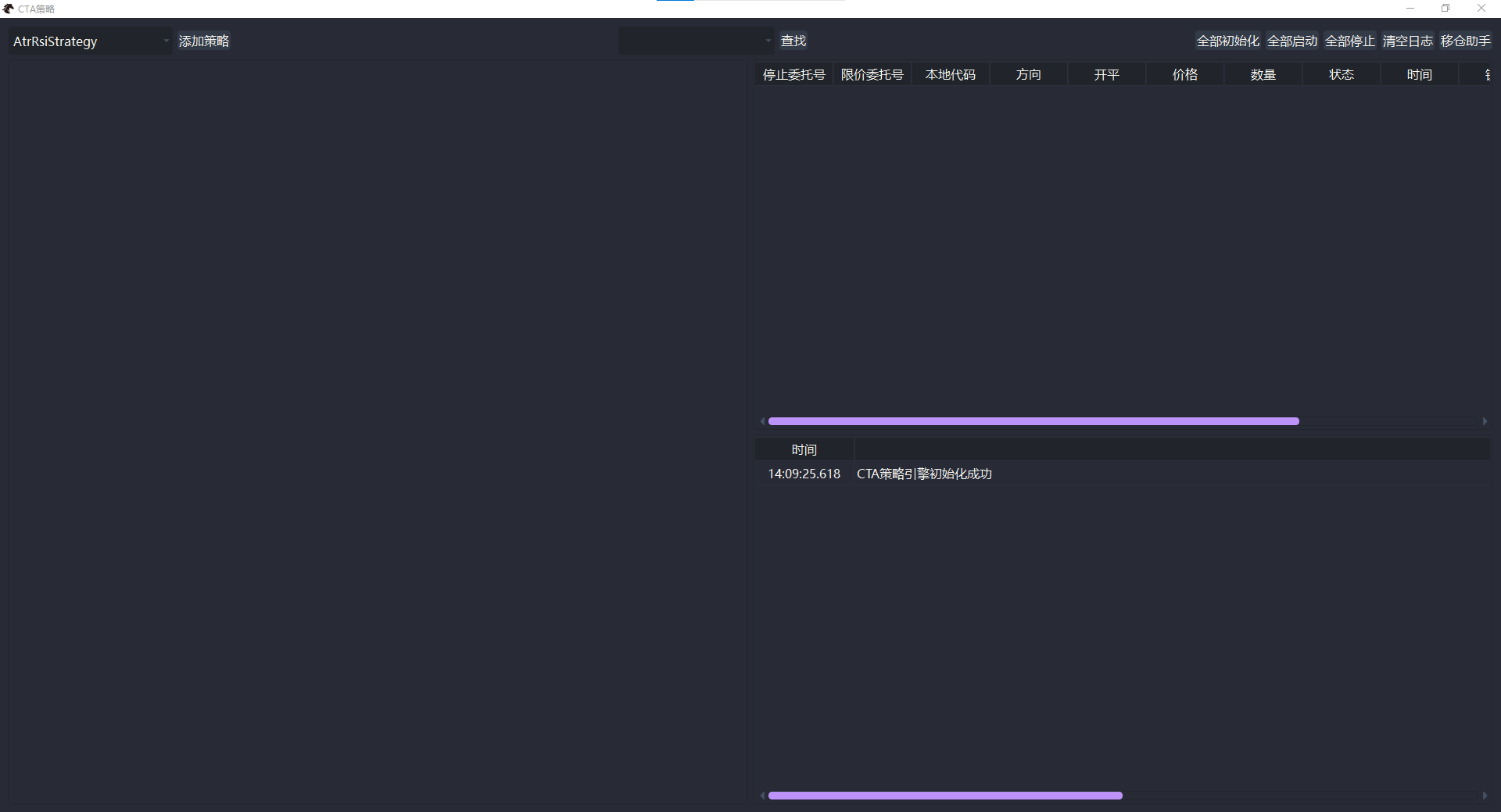 ## 加载策略 在 Fusion 中使用 CTA 策略时,通常是围绕“策略实例”来进行管理的。一个策略实例对应一组参数、一个目标合约,以及一套独立的运行状态。 典型步骤如下: 1. 选择要使用的策略; 2. 点击添加或创建策略; 3. 填写实例名称、交易合约和相关参数; 4. 完成后在监控区域中查看该策略实例。 使用过程中建议注意: - 实例名称应尽量清晰,便于区分不同合约或不同参数组合; - 合约代码和交易所应与实际交易环境保持一致; - 参数名称和参数含义应在理解后再修改,不建议仅凭感觉调整。 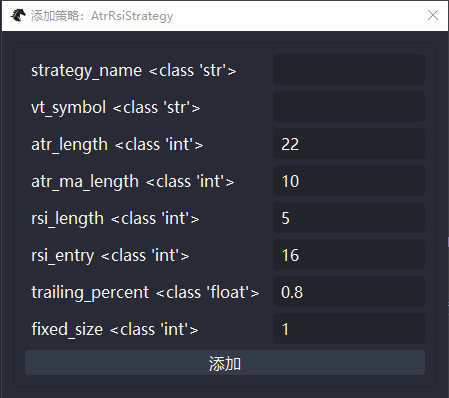 ## 配置策略参数 策略参数决定了策略运行时的行为。常见场景包括: - 调整技术指标周期; - 调整开仓、止盈或止损阈值; - 调整仓位控制相关参数; - 针对不同合约使用不同参数组合。 初次使用时,建议采用以下原则: - 先使用默认参数熟悉策略运行方式; - 每次只修改少量关键参数,避免同时改动过多内容; - 每次参数调整后,优先通过回测观察变化,而不是直接进入实盘。 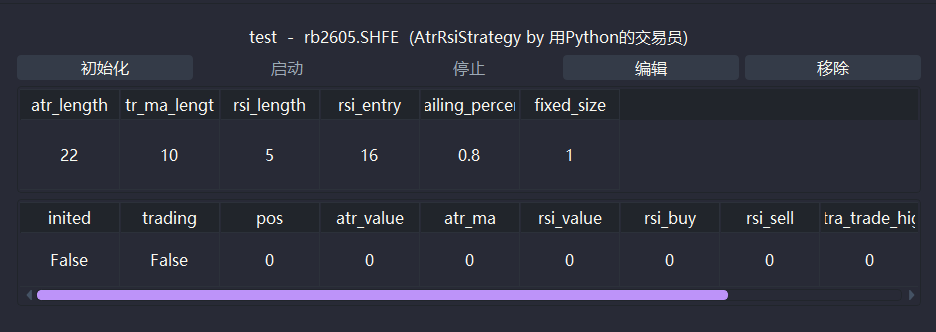 ## 启动与停止策略 创建策略实例后,通常还需要完成初始化和启动,策略才会进入可交易状态。不同策略在初始化阶段可能需要载入一定历史数据,因此启动前应先确认: - `CTP` 已成功连接; - 合约信息已正常获取; - 所需历史数据已经准备完成; - 当前市场和策略适用场景匹配。 启动后,策略会根据其逻辑持续运行;当不再需要继续运行时,可执行停止操作。 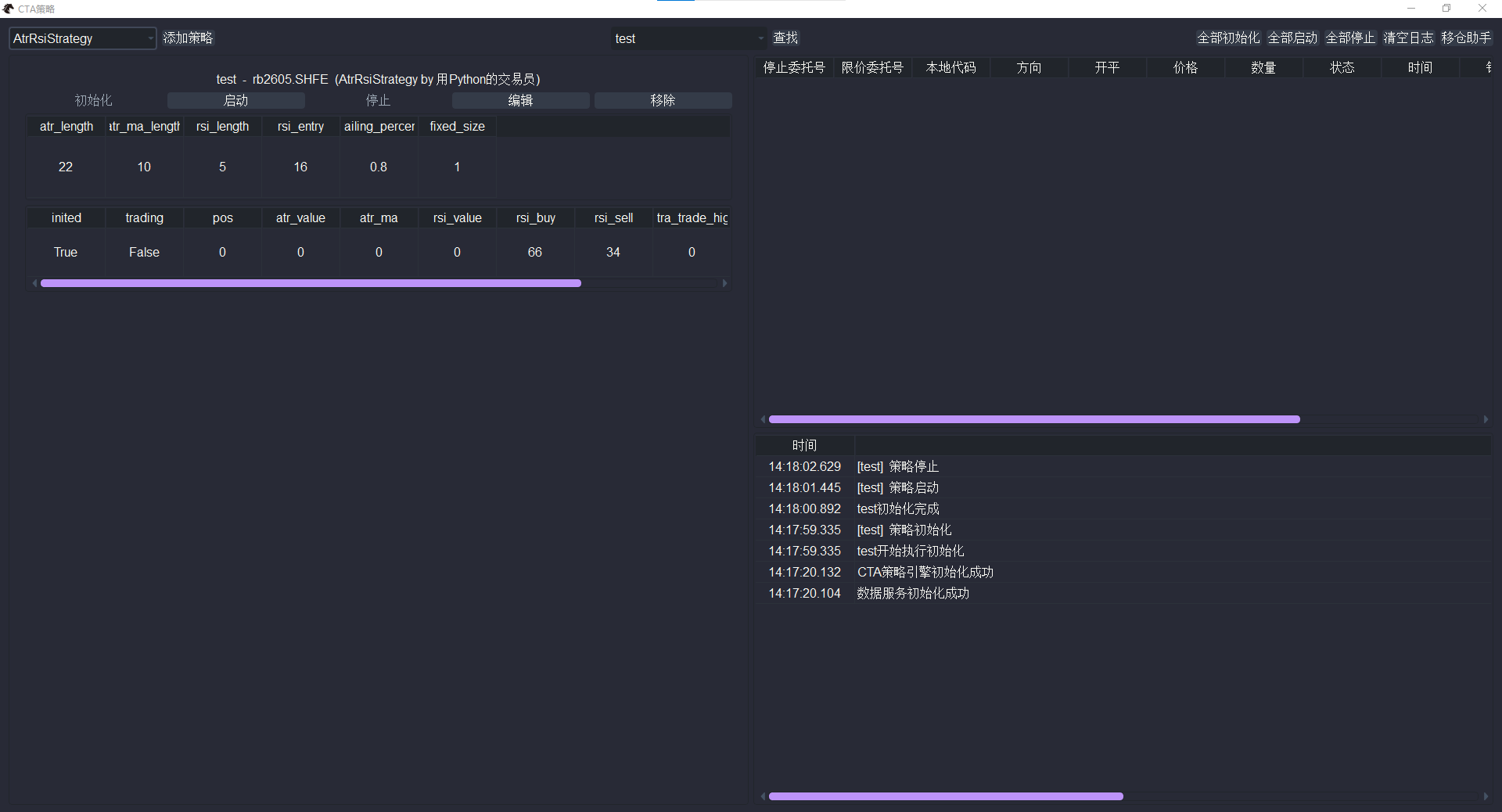 ## 观察策略运行情况 CTA 模块的价值不仅在于运行策略,更在于帮助用户观察策略是否按预期工作。建议重点关注以下内容: CTA策略图形界面: - `参数信息`:确认当前策略实例使用的是哪组参数; - `变量信息`:观察策略内部关键状态是否发生变化; - `日志`:查看初始化、启动、报错和提醒信息; VeighNa Fusion主界面: - `委托` 和 `成交`:确认策略是否真的发出并完成交易; - `持仓`:确认策略行为是否已经反映到账户层面。 请注意,CTA策略图形界面右上方显示的只是本地停止单的信息。一旦被成功触发发出超价限价单(不是触发价格)之后,需要基于显示的对应限价委托号去VeighNa Fusion主界面【委托】组件查看委托的具体信息。 如果你只是看到策略“启动成功”,但没有同步查看日志、委托和成交,那么对策略实际状态的判断通常是不完整的。  ## 使用注意事项 使用 CTA 模块时,建议牢记以下原则: - 未完成理解和验证的策略,不建议直接用于实盘; - 参数调整应尽量结合回测结果与市场特性,不宜频繁随机更改; - 先确认数据、连接和风控状态,再启动策略; - 出现异常时,应先查看日志和委托状态,不要只凭价格波动判断; - 若策略来自 `智策` 或其他辅助生成流程,必须先完成人工复核。 下一步建议继续阅读 [回测与优化](fusion_backtester.md),将策略使用与验证流程串联起来。
Shown in full with attribution under the source's licence. Licence: MIT
This summary was written by Stratmill's research agent from the original; it is not a copy of the source.