Paper Trading Mechanics, Fill Rules, and Position Accounting in VeighNa
Summary
The document explains how VeighNa’s PaperAccount module simulates trading against live market data while keeping orders local. It supports limit, market, and stop orders, with configurable slippage for market and stop executions. Orders generally wait for the next tick before matching, though users can enable immediate matching against the latest tick. Before trading a contract, its market data must be subscribed; the module can also be used alongside strategy applications for simulation.
Matching uses price-touch rules and ignores displayed order-book quantity, so qualifying orders fill completely rather than partially. The module updates order status before reporting a fill, tracks positions using the contract’s net or long-short mode, and calculates cost basis as a weighted average on opening trades while preserving it on closes. Position PnL is periodically recalculated from cost basis and latest trade price. Fills and orders are not persisted, while position changes are saved. The module does not calculate funds, so its displayed account funds remain those of the connected live account; simulated trading therefore does not reproduce full capital accounting or realistic liquidity.
Key ideas
- PaperAccount intercepts orders locally after a trading interface is connected, so they are not sent to the live server.
- Limit, market, and stop orders are supported, and matching follows price-touch rules.
- Simulated fills ignore displayed depth and execute the entire qualifying order at once.
- Opening fills update position cost using a weighted average, while closing fills leave cost basis unchanged.
- Positions are saved, but order and fill records disappear on shutdown, and simulated orders do not change displayed account funds.
Tags
Full text
# PaperAccount - 本地仿真交易模块 # PaperAccount - 本地仿真交易模块 ## 功能简介 PaperAccount是用于**本地仿真交易**的功能模块,用户可以通过其UI界面基于实盘行情进行本地化的模拟交易。 ## 加载启动 ### VeighNa Station加载 启动登录VeighNa Station后,点击【交易】按钮,在配置对话框中的【应用模块】栏勾选【PaperAccount】。 ### 脚本加载 在启动脚本中添加如下代码: ```python3 # 写在顶部 from vnpy_paperaccount import PaperAccountApp # 写在创建main_engine对象后 main_engine.add_app(PaperAccountApp) ``` ## 启动模块 在启动模块之前,请先连接要进行模拟交易的接口(连接方法详见基本使用篇的连接接口部分)。看到VeighNa Trader主界面【日志】栏输出“合约信息查询成功”之后再启动模块,如下图所示: 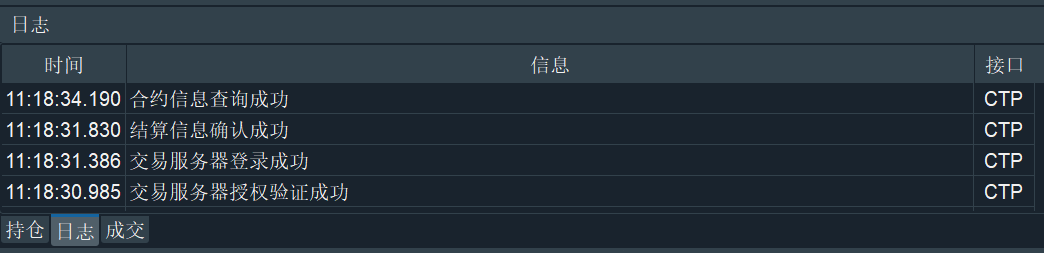 请注意,IB接口因为登录时无法自动获取所有的合约信息,只有在用户手动订阅行情时才能获取。因此需要在主界面上先行手动订阅合约行情,再启动模块。 交易接口连接后,本地模拟交易模块自动启动。此时所有合约的交易委托和撤单请求均**被本地模拟交易模块接管**,不会再发往实盘服务器。 ## 功能配置 在菜单栏中点击【功能】-> 【模拟交易】,或者点击左侧按钮栏的图标:  即可进入本地模拟交易模块的UI界面,如下图所示: 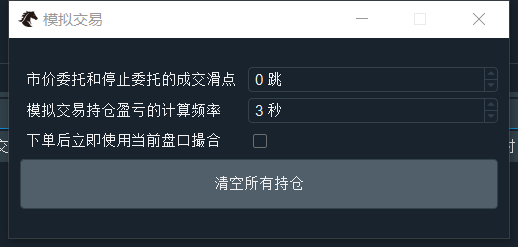 用户可以通过UI界面对以下功能进行配置: - 市价委托和停止委托的成交滑点 - 用于影响市价单和停止单成交时,成交价格相对于盘口价格的**滑点跳数**; - 模拟交易持仓盈亏的计算频率 - 多少秒执行一次持仓盈亏计算更新,如果持仓较多时发现程序卡顿,建议尝试调低频率; - 下单后立即使用当前盘口撮合 - 默认情况下,用户发出的委托需要**等到下一个TICK盘口推送才会撮合**(模拟实盘情景),对于TICK推送频率较低的不活跃合约可以勾选该选项,委托后会**立即基于当前的最新TICK盘口撮合**; - 清空所有持仓 - 一键清空本地所有持仓数据。 本地模拟交易模块同样可以和其他策略应用模块(如CtaStrategy模块、SpreadTrading模块等)一起使用,从而实现本地化的量化策略仿真交易测试。 ## 数据监控 用户可以通过【查询合约】来查询确认合约的交易接口状态: 点击菜单栏的【帮助】->【合约查询】,在弹出的对话框中直接点击右上角的【查询】按钮,发现所有合约的【交易接口】列均显示为PAPER,如下图所示: 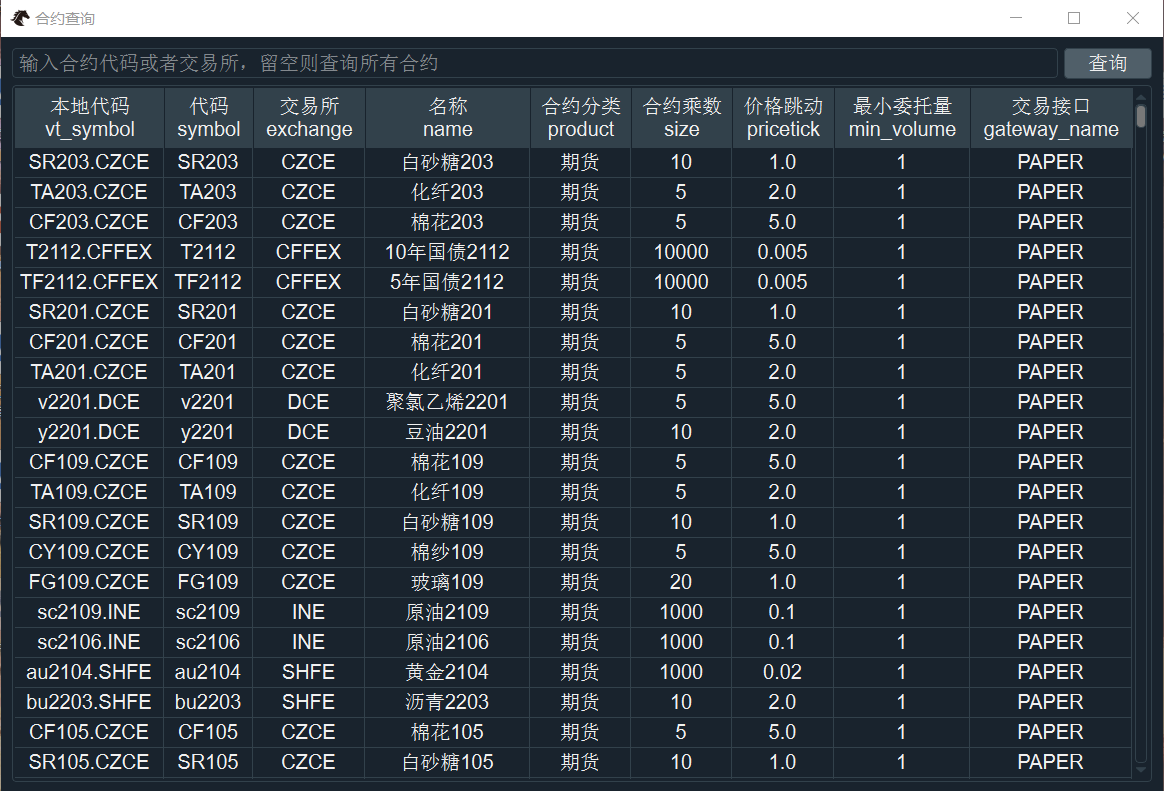 在对某一合约进行下单和撤单操作前,用户必须先**订阅**该合约的行情。 下图中【委托】、【成交】、【持仓】三个监控组件中显示的信息,其接口列均为PAPER(本地模拟数据): 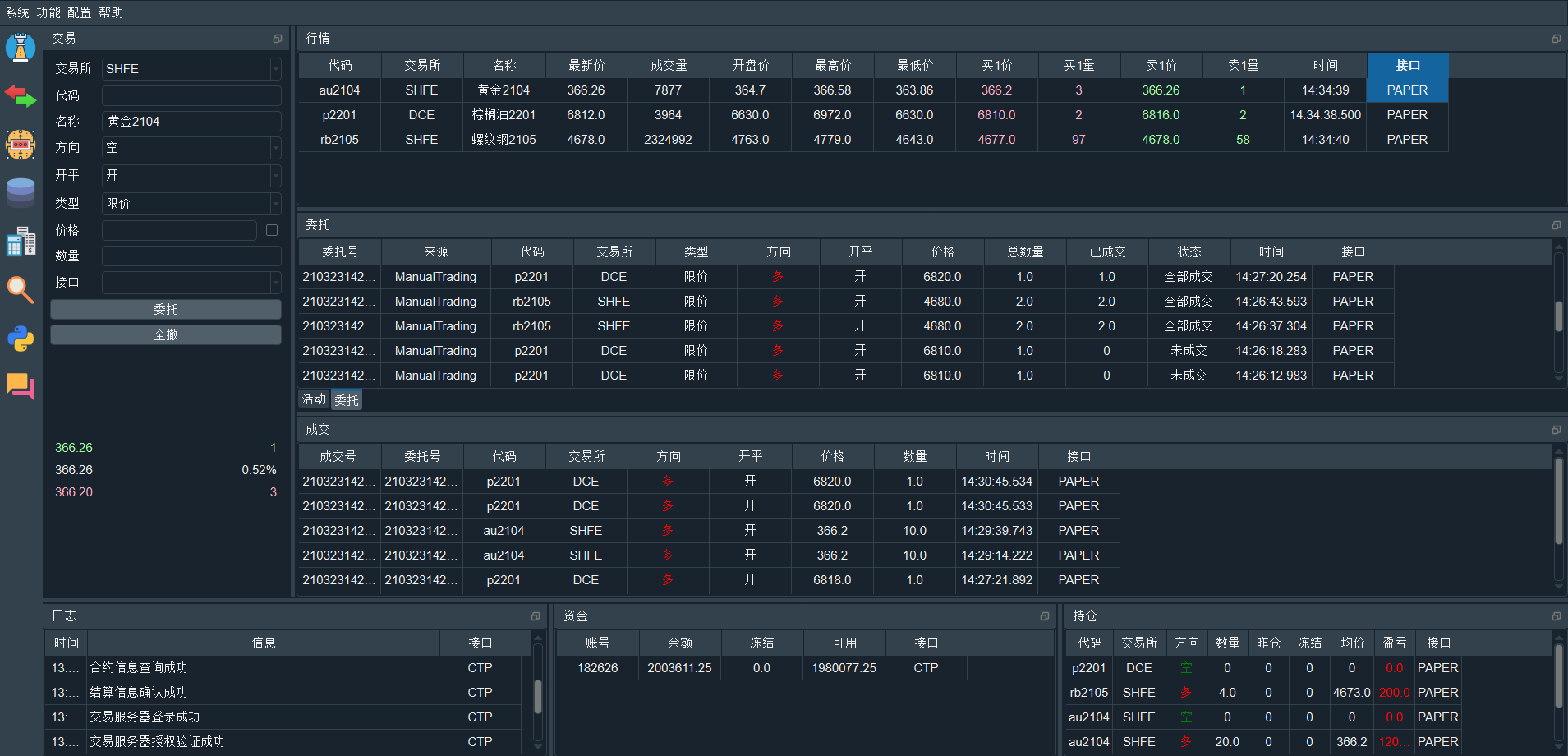 请注意,本地模拟交易模块**没有提供资金计算功能**,所以【资金】组件显示的是实盘账号的资金,并不会因为在本地模拟交易模块产生的委托而改变。 ## 业务逻辑 本地模拟交易模块的业务逻辑如下所示: - 支持的委托类型(不支持的类型会被拒单): - 限价单; - 市价单; - 停止单; - 委托撮合规则采用**到价成交**模式,以买入委托为例: - 限价单:当盘口卖1价ask_price_1小于等于委托价格,则成交; - 停止单:当盘口卖1价ask_price_1大于等于委托价格,则成交; - 委托成交时**不考虑盘口挂单量**,一次性全部成交; - 委托成交后,先推送委托状态更新OrderData,再推送成交信息TradeData,**和实盘交易中的顺序一致**; - 委托成交后,模块会自动记录相应的持仓信息PositionData: - 根据合约本身的持仓模式(多空仓 vs 净仓位)信息,维护对应的持仓信息; - **开仓成交时,采用加权平均计算更新持仓成本价;** - **平仓成交时,持仓成本价不变;** - 多空仓模式下,挂出平仓委托后会冻结相应的持仓数量,可用数量不足时会拒单; - 持仓的盈亏会基于持仓成本价和最新成交价定时计算(默认频率1秒); - 数据的持久化保存: - 成交数据和委托数据不保存,关闭VeighNa Trader后即消失; - 持仓数据会在有变化时**立即写入硬盘文件**,重启VeighNa Trader登录交易接口后即可看到(要收到相应的合约信息)。
Shown in full with attribution under the source's licence. Licence: MIT
This summary was written by Stratmill's research agent from the original; it is not a copy of the source.