Portfolio P&L Tracking and Daily Mark-to-Market Calculations
Summary
This document explains a portfolio management interface for monitoring strategy-level positions, trades, and profit and loss during the trading day. It treats each order source, such as manual trading or a strategy module, as a separate portfolio and describes the table fields for opening and current positions, long and short fills, trading P&L, holding P&L, and total P&L. A separate table lists fills and can be filtered by portfolio.
The P&L method follows daily futures settlement logic: it maps existing positions and intraday position changes to price movements and contract size, then derives net P&L by subtracting fees and slippage. Users can adjust the calculation refresh frequency and expand or filter portfolio views. The guide also notes operational limits: position data is cached on orderly shutdown, and the automatic overnight transfer of total positions into the next day's opening positions may not suit 24-hour markets. It describes manual cache correction for erroneous or obsolete position records, but gives no performance evidence or guidance for evaluating strategy quality.
Key ideas
- Order references let the manager separate trading activity into portfolios by source.
- The interface reports opening and current positions, fills, and trading and holding P&L.
- P&L uses daily mark-to-market logic based on price changes and contract size.
- Net P&L subtracts fees and slippage from total P&L.
- Overnight position rollover may be unsuitable for 24-hour markets, and unsaved data can be lost if the application is terminated abruptly.
Tags
Full text
# PortfolioManager - 投资组合管理模块
# PortfolioManager - 投资组合管理模块
## 功能简介
PortfolioManager是用于**投资组合管理**的功能模块,用户可以在盘中通过其UI界面对交易策略进行实时的业绩跟踪和盈亏分析。
## 加载启动
### VeighNa Station加载
启动登录VeighNa Station后,点击【交易】按钮,在配置对话框中的【应用模块】栏勾选【PortfolioManager】。
### 脚本加载
在启动脚本中添加如下代码:
```python3
# 写在顶部
from vnpy_portfoliomanager import PortfolioManagerApp
# 写在创建main_engine对象后
main_engine.add_app(PortfolioManagerApp)
```
## 启动模块
在菜单栏中点击【功能】-> 【投资组合】,或者点击左侧按钮栏的图标:

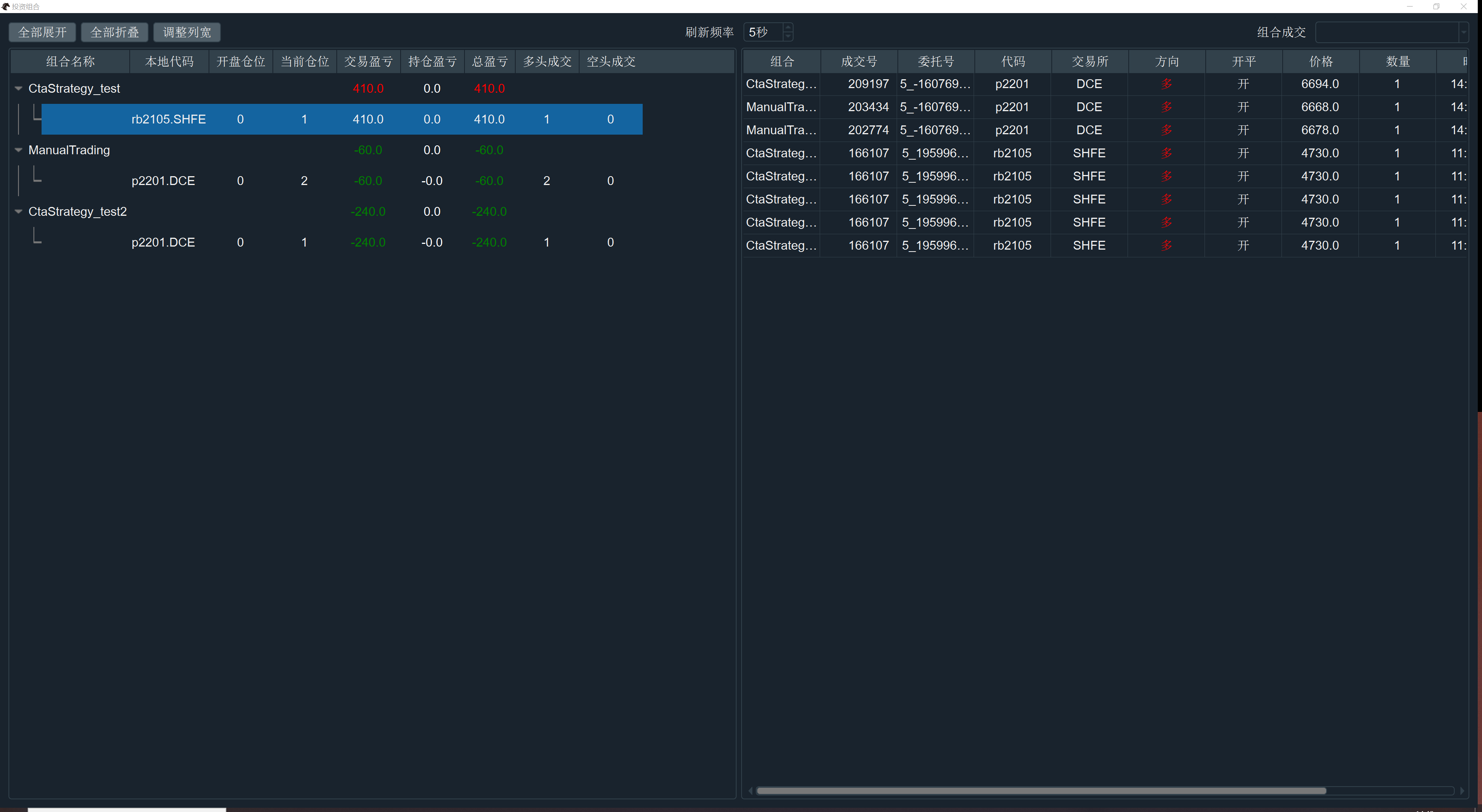
即可进入投资组合管理模块的UI界面,如下图所示:
## 组合信息表
界面整体可以分为左右两部分,左边显示的是当前已有投资组合的信息表,如下图所示:
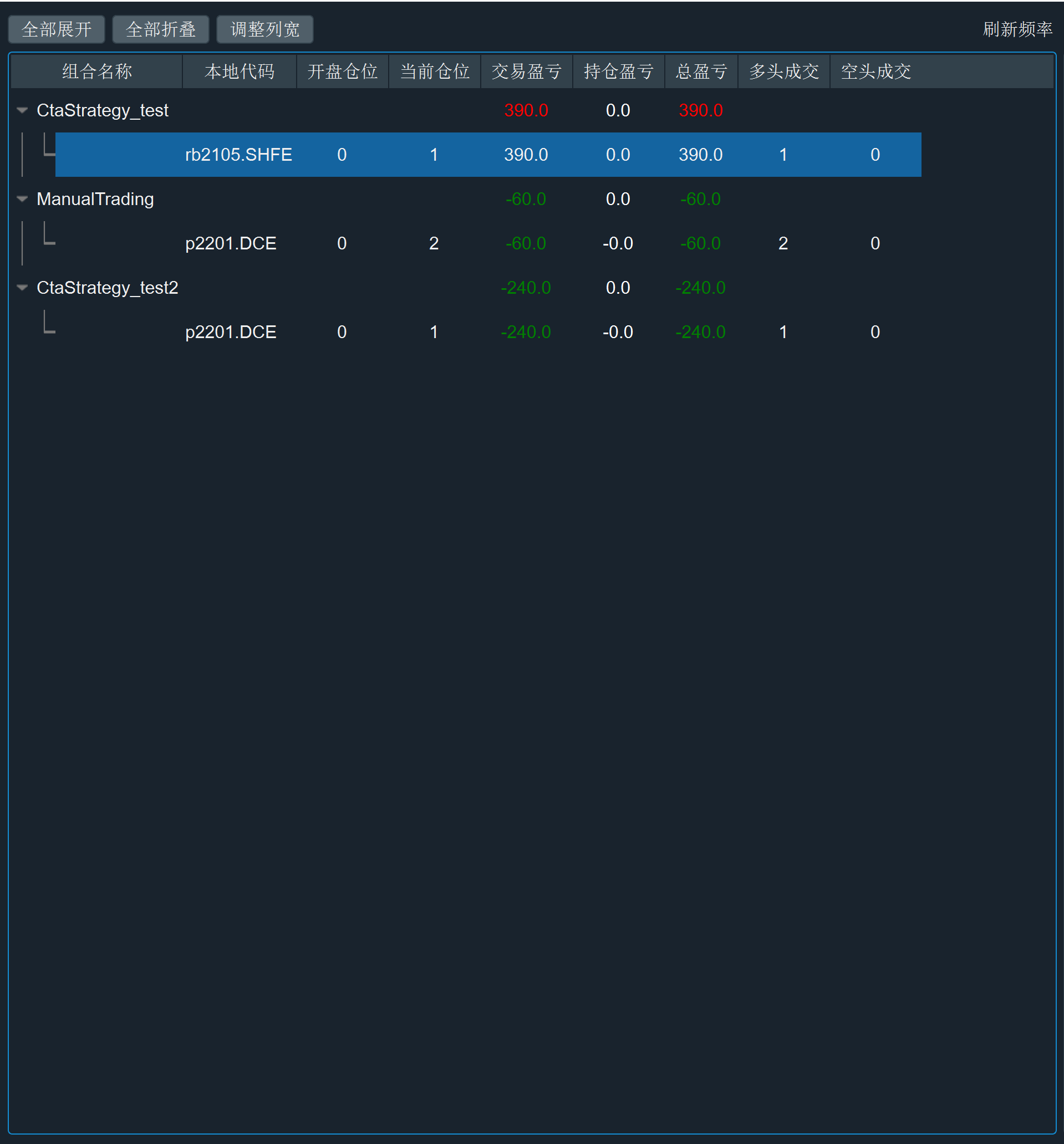
组合信息表每列的含义如下:
- 组合名称:委托来源标识(reference),所有从VeighNa发出的委托请求都可以直接通过该标识来区分其交易来源,如手动交易、算法执行、量化策略等,每个交易来源可以视作一个独立的投资组合。
- 手动交易:ManualTrading
- CTA策略:CtaStrategy_策略名
- 价差交易:SpreadTrading_价差名
- 期权交易:OptionMaster_ElectronicEye/DeltaHedging
- 算法交易:AlgoTrading_算法编号
- 脚本策略:ScriptTrader
- 组合策略:PortfolioStrategy_策略名
- 本地代码:带交易所后缀的合约代码(vt_symbol)
- 开盘仓位:昨日收盘时(今日开盘),投资组合内该合约的持仓
- 当前仓位:开盘仓位加上今日成交数量(多头成交 - 空头成交)的结果
- 交易盈亏:今日所有成交,以成交价格映射到当前最新价的盈亏
- 持仓盈亏:组合开盘仓位,以昨收盘价映射到当前最新价的盈亏
- 总盈亏:交易盈亏和持仓盈亏的和
- 多头成交:投资组合内该合约今日买开和买平成交数量
- 空头成交:投资组合内该合约今日卖开和卖平成交数量
其中,交易盈亏(TradingPnl)和持仓盈亏(HoldingPnl)的计算方式采用的是期货交易所每日结算时所用的逐日盯市(Marking to Market)算法,计算过程如下所示:
- 交易盈亏 = 持仓量 * (当日收盘价-昨日收盘价)* 合约规模
- 持仓盈亏 = 持仓变化量 * (当日收盘价 - 开仓成交价)* 合约规模
- 总盈亏 = 交易盈亏 + 持仓盈亏
- 净盈亏 = 总盈亏 - 总手续费 - 总滑点
用户可以通过展开和折叠投资组合,调整列宽来查看信息:
- 点击每个投资组合左侧的箭头可以展开和折叠各投资组合的信息;
- 点击顶部的【全部展开】和【全部折叠】按钮对所有投资组合进行批量操作;
- 点击【调整列宽】按钮可以自动调整表格每列的宽度。
## 成交记录表
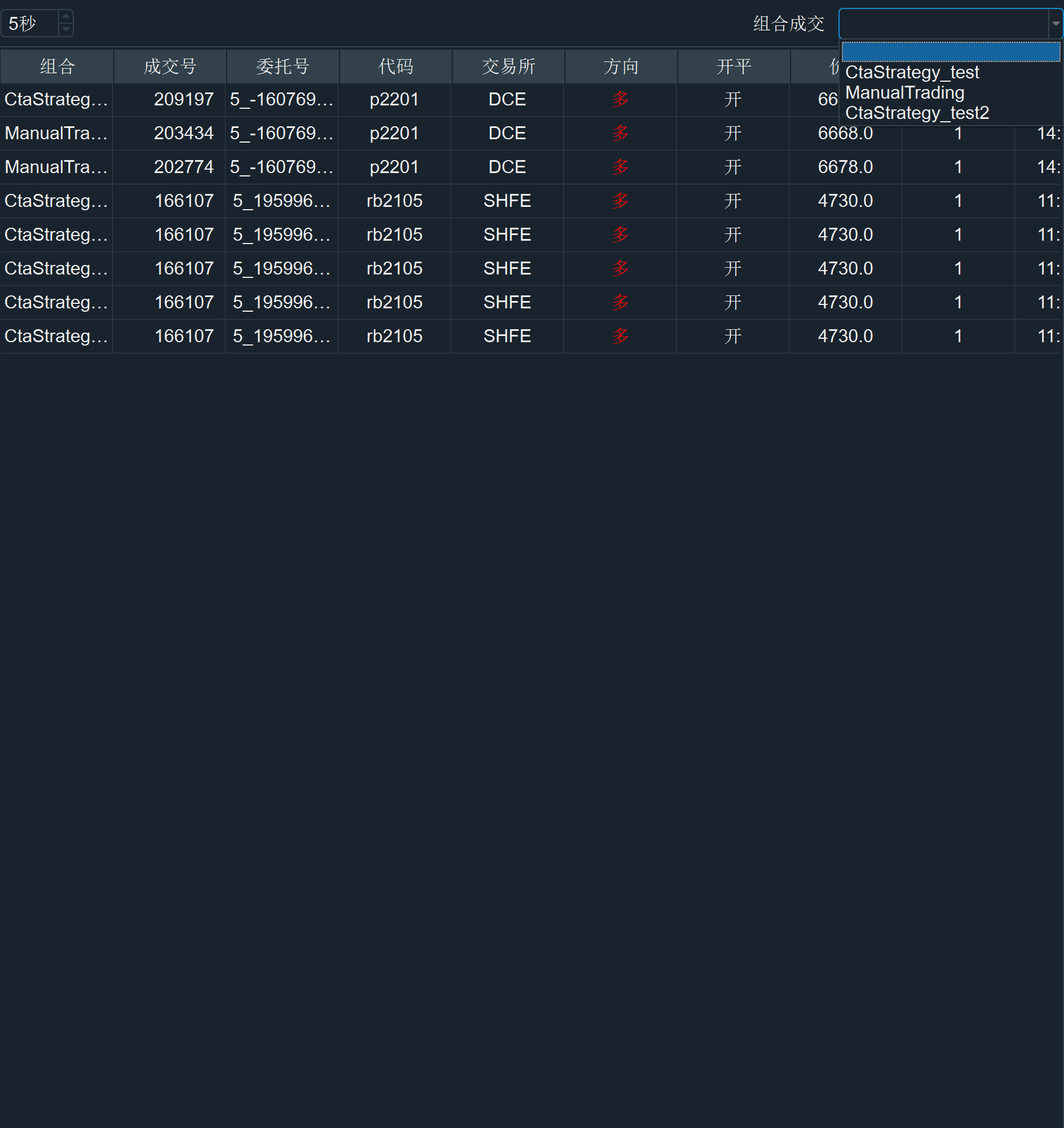
界面右侧部分显示的是所有成交记录,点击右上角的下拉框可以根据投资组合进行筛选,如下图所示:
## 刷新频率
投资组合的盈亏基于定时逻辑自动计算,计算频率可以通过顶部中间的选项框进行调整,如下图所示:

请注意,所有组合的持仓数据会在关闭VeighNa Trader时写入缓存文件中,所以不要直接杀进程退出,会丢失数据。
在隔日加载时,程序会自动将昨天的总仓位结算到今天的昨仓数据字段中,该逻辑对于24小时交易的市场(外盘期货)不一定合适,后续考虑加入每日定时结算或者手动结算功能。
如果发现有仓位记录错误,或者策略已经移除的情况,可以手动修改缓存文件,再重新启动VeighNa Trader即可。
Windows系统上缓存文件的默认路径位于:
C:\Users\Administrator\.vntrader\portfolio_manager_data.json
其中Administrator是当前Windows系统的用户名。Shown in full with attribution under the source's licence. Licence: MIT
This summary was written by Stratmill's research agent from the original; it is not a copy of the source.