Pre-Trade Controls for Limiting Automated Trading Errors
Summary
This guide explains how pre-trade controls can block orders that exceed preset limits, helping reduce accidental oversizing, excessive order flow, and other operational errors. It describes common controls for order frequency, reset intervals, single-order size, total filled volume, active orders, and cancellations for an individual contract. These settings govern whether trading behavior stays within defined boundaries; they do not assess whether a strategy is profitable.
For new users, the guide recommends enabling controls, beginning with conservative limits, and adjusting them gradually as the strategy and trading pace become familiar. When a rule triggers, it advises identifying the specific limit, deciding whether the block is appropriate, and changing settings only after reviewing the trading state. It also recommends pairing risk controls with backtesting and simulated or live strategy observation. No numerical settings or measured outcomes are provided, so limits must be chosen for the user’s own system and trading context.
Key ideas
- Pre-trade risk controls can prevent orders that breach preset behavioral limits.
- Common limits cover order flow, order size, fills, active orders, and cancellations.
- These controls manage execution behavior rather than strategy profitability.
- Conservative initial settings can be adjusted gradually as the system becomes better understood.
- After a rule triggers, identify its cause before changing limits, and use the controls alongside strategy evaluation.
Tags
Full text
# 风控管理 # 风控管理 `风控` 模块用于在委托发出前对交易行为进行检查,帮助用户减少误操作、过度交易和明显超限的情况。对于刚接触量化交易的用户来说,风控不是“可有可无”的附加项,而是实盘前应尽早建立的基础保护机制。 ## 为什么需要风控 在程序化交易环境中,错误往往不是来自单一一笔委托,而是来自连续、重复且高速的操作。启用风控的价值主要体现在: - 限制短时间内过多委托; - 限制单笔委托数量过大; - 限制活动委托数量过多; - 控制单日成交总量或撤单次数; - 在策略异常或参数失误时提供第一道前端保护。 ## 常见风控规则 打开 `【功能】->【交易风控】` 后,可进入交易风控模块。 Fusion 中常见的风控项通常包括: - 委托流控上限; - 流控清空时间; - 单笔委托上限; - 总成交上限; - 活动委托上限; - 单合约撤单上限。 这些规则并不用于判断策略是否盈利,而是用于控制交易行为是否超过你事先设定的安全边界。  ## 新手如何设置 如果你刚开始使用 Fusion,建议采用“先保守、后调整”的思路: - 先启用风控,再逐步优化参数; - 先设置明确的单笔下单量限制; - 对活动委托数量和撤单次数设置较为保守的上限; - 在对策略和交易节奏更熟悉后,再结合实际情况逐步调整。 如果你暂时无法判断某个参数应如何设置,可以先采用较保守的值,避免在不了解的情况下把限制设得过于宽松。 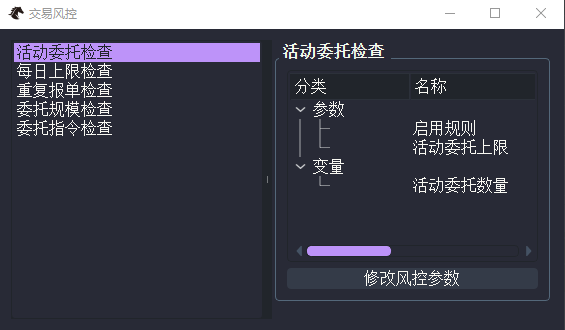 ## 风控触发后的处理 当风控规则被触发时,系统通常会阻止对应委托继续发出,并在日志或相关界面中给出提示。 此时建议按以下顺序处理: 1. 先确认触发的是哪一条风控规则; 2. 判断这是正常保护还是参数设置过严; 3. 如有必要,再结合当前交易状态调整参数; 4. 调整后重新保存并观察是否恢复正常。 不要在未理解触发原因的情况下,直接关闭风控或大幅放宽全部限制。 ## 使用建议 在实际使用中,建议把风控与以下流程配合起来: - 先通过 [回测与优化](fusion_backtester.md) 验证策略; - 再通过 [CTA策略](fusion_cta.md) 观察策略实盘或仿真运行情况; - 同时启用风控,降低参数错误或异常行为带来的风险; - 若策略来自 [智策](../agent/fusion_agent_intro.md),更应保留人工风控和人工复核环节。 对于入门用户来说,风控并不会让策略“变好”,但可以显著降低因为错误操作而造成的额外风险。
Shown in full with attribution under the source's licence. Licence: MIT
This summary was written by Stratmill's research agent from the original; it is not a copy of the source.